
Clean Architecture in .NET (Without Dogma)
You don’t need MediatR or complex frameworks to apply Clean Architecture. You need clear boundaries and good judgment.
What is Clean Architecture (and why teams use it)
Clean Architecture is a way to structure a codebase so that business rules stay protected from things that change often: frameworks, databases, UI, and third‑party services.
The core idea is simple:
- Dependencies point inward (business rules should not depend on outer details).
- Use cases are explicit (your application logic is not “hidden” inside controllers or repositories).
- Infrastructure is replaceable (swap SQL for Postgres, in‑memory for Redis, or a real HTTP client for a fake one in tests).
This is why teams adopt it: it makes systems easier to change safely as they grow.
The 4 layers (explained like a human)
Clean Architecture is usually described as concentric circles. In practice, most .NET projects map it to four layers:
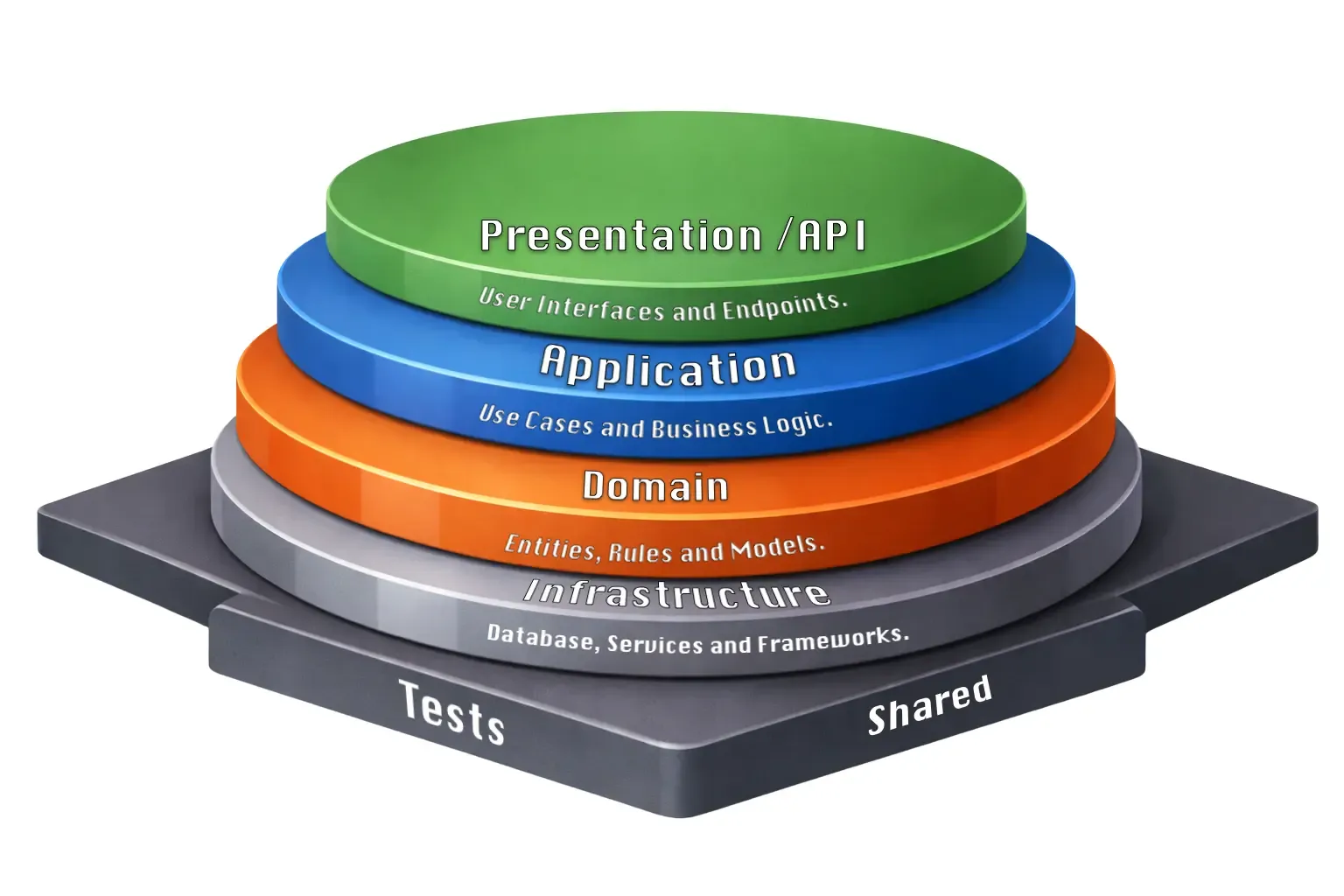
1) API (or Presentation)
What it does: HTTP concerns only.
- receives requests
- validates shape (basic)
- returns responses and status codes
- delegates business work to the Application layer
What it should NOT do: business rules, database calls, complex orchestration.
The API layer should be a thin delivery mechanism, not the brain of the system.
2) Application (Use cases)
What it does: application behavior (the “verbs” of your system).
CreateMovieGetMovieDetailsSearchMovies
This layer orchestrates work: calls repositories, calls services, applies policies, and returns results.
Key goal: make the use cases easy to read and easy to test.
3) Domain (Business rules)
What it does: the “truth” of the business.
- entities
- invariants
- value objects
- domain rules that must hold no matter what
Key goal: no dependencies on frameworks or infrastructure.
If your domain imports EF Core, ASP.NET, or anything web-related… it’s not a domain layer.
4) Infrastructure (Details)
What it does: implementation of external details.
- database repositories
- file storage
- message brokers
- HTTP clients
Infrastructure depends on Application/Domain, not the other way around.
Problems Clean Architecture solves
1) “Everything is coupled to everything”
When controllers talk directly to EF DbContext, your API becomes married to your database strategy. Changing persistence becomes scary.
Clean Architecture helps because the API talks to a use case, and the use case talks to an abstraction.
2) Knowledge gets trapped in infrastructure
If your “business logic” lives inside SQL queries, stored procedures, controllers, or ORMs, it becomes harder to test and easier to break.
Clean Architecture forces you to name your behaviors (use cases) and keep them in one place.
3) Testing becomes realistic (and faster)
Use cases can be unit tested without spinning up the web server, database, or a full environment.
That’s not “testing for fun” — that’s reducing risk.
Common bad practices (and how teams accidentally ruin it)
1) Too many layers that do nothing ❌
A classic anti-pattern is “Clean Architecture theater”:
CreateMovieHandlerCreateMovieServiceCreateMovieManagerCreateMovieProcessorCreateMovieCoordinator
…where each class just forwards the call to the next one.
If a layer doesn’t add a clear responsibility, it’s not architecture — it’s noise.
Rule of thumb:
If you can delete a layer and nothing meaningful changes, that layer didn’t deserve to exist.
2) Turning every request into a mini framework ❌
You don’t need a framework to implement Clean Architecture. You need boundaries.
A lot of teams add MediatR (or similar) by default. The trade-off is real:
- ✅ pipelines and behaviors can be nice
- ❌ flow becomes harder to trace
- ❌ debugging can feel indirect
- ❌ newcomers have more mental overhead
You can apply Clean Architecture with plain interfaces and classes — clearly and predictably.
The example: a Movies API (without MediatR)
We’ll build a small Movies API:
POST /api/movies→ create a movieGET /api/movies/{id}→ fetch details
We’ll keep it intentionally small so the structure is easy to see.
Project structure
src/
 ├── Movies.Api
 │   ├── Controllers
 │   └── Program.cs
 ├── Movies.Application
 │   ├── Abstractions
 │   ├── UseCases
 │   └── DTOs
 ├── Movies.Domain
 │   └── Entities
 └── Movies.Infrastructure
     └── Repositories
Why this matters: it makes it obvious where code should live.
Domain layer: the Movie entity
namespace Movies.Domain.Entities;

public class Movie
{
    public Guid Id { get; private set; }
    public string Title { get; private set; }

    public Movie(string title)
    {
        Id = Guid.NewGuid();
        Title = title;
    }
}
What to notice
- No ASP.NET types.
- No EF Core attributes.
- No database concerns.
This entity is valid whether your storage is SQL, NoSQL, or a flat file.
The domain is the part you want to keep stable for years.
Application layer: define the behavior
DTO (input)
namespace Movies.Application.DTOs;

public record CreateMovieRequest(string Title);
Why a DTO?
Because your API contract is not the same thing as your domain model.
A DTO is a boundary object.
Repository contract
namespace Movies.Application.Abstractions;

using Movies.Domain.Entities;

public interface IMovieRepository
{
    Task AddAsync(Movie movie);
    Task<Movie?> GetByIdAsync(Guid id);
}
Why an interface here?
Because the Application layer should not know how persistence works — only what it needs.
This makes Infrastructure replaceable and testing easier.
Use case: CreateMovie
namespace Movies.Application.UseCases;

using Movies.Application.Abstractions;
using Movies.Application.DTOs;
using Movies.Domain.Entities;

public interface ICreateMovieUseCase
{
    Task ExecuteAsync(CreateMovieRequest request);
}

public class CreateMovieUseCase : ICreateMovieUseCase
{
    private readonly IMovieRepository _repository;

    public CreateMovieUseCase(IMovieRepository repository)
    {
        _repository = repository;
    }

    public async Task ExecuteAsync(CreateMovieRequest request)
    {
        var movie = new Movie(request.Title);
        await _repository.AddAsync(movie);
    }
}
What to notice
- The use case reads like a sentence: create a movie, save it.
- The use case is testable with a fake repository.
- There is no HTTP logic here. No status codes. No controllers.
Use cases are where the “verbs” of your system live.
Infrastructure layer: a simple repository implementation
namespace Movies.Infrastructure.Repositories;

using Movies.Application.Abstractions;
using Movies.Domain.Entities;

public class InMemoryMovieRepository : IMovieRepository
{
    private readonly List<Movie> _movies = new();

    public Task AddAsync(Movie movie)
    {
        _movies.Add(movie);
        return Task.CompletedTask;
    }

    public Task<Movie?> GetByIdAsync(Guid id)
    {
        return Task.FromResult(_movies.FirstOrDefault(m => m.Id == id));
    }
}
What to notice
- Infrastructure implements the contract the Application layer asked for.
- Swapping this for EF Core later is isolated to Infrastructure.
This is the “details” layer. Details can change freely.
API layer: Controllers should be thin
namespace Movies.Api.Controllers;

using Microsoft.AspNetCore.Mvc;
using Movies.Application.DTOs;
using Movies.Application.UseCases;

[ApiController]
[Route("api/movies")]
public class MoviesController : ControllerBase
{
    private readonly ICreateMovieUseCase _createMovie;

    public MoviesController(ICreateMovieUseCase createMovie)
    {
        _createMovie = createMovie;
    }

    [HttpPost]
    public async Task<IActionResult> Create([FromBody] CreateMovieRequest request)
    {
        await _createMovie.ExecuteAsync(request);
        return StatusCode(201);
    }
}
What to notice
- Controller coordinates HTTP only.
- It delegates the actual work to the use case.
This makes controllers easy to maintain and easy to refactor without breaking business rules.
Wiring it together (Dependency Injection)
builder.Services.AddScoped<ICreateMovieUseCase, CreateMovieUseCase>();
builder.Services.AddScoped<IMovieRepository, InMemoryMovieRepository>();
Why explicit DI is good here
You can “see the system” in one place. No magic scanning required.
CQRS (and why it fits naturally with Clean Architecture)
CQRS means separating:
- Commands (write operations that change state)
- Queries (read operations that return data)
You don’t have to go “full CQRS” to get benefits. Even a simplified approach helps:
- Write use cases focus on correctness + transactions
- Read use cases focus on fast queries + tailored view models
This is especially valuable when reads are heavy and writes need to be safe.
Read replicas vs transactional writes (the real-world advantage)
In many production systems:
- Writes go to a primary transactional database (strong consistency, locks, constraints).
- Reads can go to a read replica (scaled out for query load).
Why this is useful
- Keeps the primary DB healthier (writes don’t fight with heavy reads).
- Improves performance for read-heavy endpoints.
- Enables scaling reads horizontally.
The trade-off (be honest)
Read replicas can be slightly behind (replication lag), so you might not see a write immediately.
That’s why CQRS is not “free”. It’s a trade.
A practical approach: use replicas for read-heavy pages where “seconds behind” is acceptable, and route consistency-critical reads to the primary.
Use case: GetMovieDetails
Now let’s implement the read side. First, the response DTO:
namespace Movies.Application.DTOs;

public record MovieDetailsResponse(Guid Id, string Title);
The use case:
namespace Movies.Application.UseCases;

using Movies.Application.Abstractions;
using Movies.Application.DTOs;

public interface IGetMovieDetailsUseCase
{
    Task<MovieDetailsResponse?> ExecuteAsync(Guid id);
}

public class GetMovieDetailsUseCase : IGetMovieDetailsUseCase
{
    private readonly IMovieRepository _repository;

    public GetMovieDetailsUseCase(IMovieRepository repository)
    {
        _repository = repository;
    }

    public async Task<MovieDetailsResponse?> ExecuteAsync(Guid id)
    {
        var movie = await _repository.GetByIdAsync(id);

        if (movie is null)
            return null;

        return new MovieDetailsResponse(movie.Id, movie.Title);
    }
}
And the controller endpoint:
[HttpGet("{id:guid}")]
public async Task<IActionResult> GetById(Guid id)
{
    var movie = await _getMovieDetails.ExecuteAsync(id);

    if (movie is null)
        return NotFound();

    return Ok(movie);
}
What to notice
- The use case returns a DTO, not the domain entity.
- The controller handles HTTP semantics (404 for not found).
- The use case remains testable and reusable.
The Result Pattern (handling errors without exceptions)
Returning null works for simple cases, but what about validation errors, business rule violations, or different failure modes?
The Result Pattern makes success and failure explicit:
namespace Movies.Application.Common;

public class Result<T>
{
    public T? Value { get; }
    public string? Error { get; }
    public bool IsSuccess => Error is null;
    public bool IsFailure => !IsSuccess;

    private Result(T? value, string? error)
    {
        Value = value;
        Error = error;
    }

    public static Result<T> Success(T value) => new(value, null);
    public static Result<T> Failure(string error) => new(default, error);
}
Now use cases can communicate why something failed:
public interface ICreateMovieUseCase
{
    Task<Result<Guid>> ExecuteAsync(CreateMovieRequest request);
}

public class CreateMovieUseCase : ICreateMovieUseCase
{
    private readonly IMovieRepository _repository;

    public CreateMovieUseCase(IMovieRepository repository)
    {
        _repository = repository;
    }

    public async Task<Result<Guid>> ExecuteAsync(CreateMovieRequest request)
    {
        if (string.IsNullOrWhiteSpace(request.Title))
            return Result<Guid>.Failure("Title is required");

        if (request.Title.Length > 200)
            return Result<Guid>.Failure("Title must be 200 characters or less");

        var movie = new Movie(request.Title);
        await _repository.AddAsync(movie);

        return Result<Guid>.Success(movie.Id);
    }
}
The controller translates results to HTTP:
[HttpPost]
public async Task<IActionResult> Create([FromBody] CreateMovieRequest request)
{
    var result = await _createMovie.ExecuteAsync(request);

    if (result.IsFailure)
        return BadRequest(new { error = result.Error });

    return CreatedAtAction(nameof(GetById), new { id = result.Value }, null);
}
Why this matters
- No hidden exceptions for expected failures.
- The use case signature tells you it can fail.
- Controllers become simple translators.
- Testing is straightforward: assert
IsSuccessorIsFailure.
Validation with FluentValidation
For complex validation rules, inline checks become messy. FluentValidation keeps rules organized and reusable.
First, install the package:
dotnet add package FluentValidation.DependencyInjectionExtensionsDefine a validator:
namespace Movies.Application.Validators;

using FluentValidation;
using Movies.Application.DTOs;

public class CreateMovieRequestValidator : AbstractValidator<CreateMovieRequest>
{
    public CreateMovieRequestValidator()
    {
        RuleFor(x => x.Title)
            .NotEmpty().WithMessage("Title is required")
            .MaximumLength(200).WithMessage("Title must be 200 characters or less")
            .Must(NotContainSpecialCharacters).WithMessage("Title contains invalid characters");
    }

    private bool NotContainSpecialCharacters(string title)
    {
        return !title.Any(c => c == '<' || c == '>' || c == '&');
    }
}
Integrate with the use case:
public class CreateMovieUseCase : ICreateMovieUseCase
{
    private readonly IMovieRepository _repository;
    private readonly IValidator<CreateMovieRequest> _validator;

    public CreateMovieUseCase(
        IMovieRepository repository,
        IValidator<CreateMovieRequest> validator)
    {
        _repository = repository;
        _validator = validator;
    }

    public async Task<Result<Guid>> ExecuteAsync(CreateMovieRequest request)
    {
        var validation = await _validator.ValidateAsync(request);

        if (!validation.IsValid)
        {
            var errors = string.Join("; ", validation.Errors.Select(e => e.ErrorMessage));
            return Result<Guid>.Failure(errors);
        }

        var movie = new Movie(request.Title);
        await _repository.AddAsync(movie);

        return Result<Guid>.Success(movie.Id);
    }
}
Register validators in DI:
builder.Services.AddValidatorsFromAssemblyContaining<CreateMovieRequestValidator>();What to notice
- Validation rules live in one place.
- Rules are testable independently.
- The use case stays focused on orchestration.
Unit Testing the Use Case
Here’s where Clean Architecture pays off. Testing is simple because dependencies are abstracted.
namespace Movies.Tests.UseCases;

using FluentValidation;
using FluentValidation.Results;
using Moq;
using Movies.Application.Abstractions;
using Movies.Application.DTOs;
using Movies.Application.UseCases;
using Movies.Domain.Entities;

public class CreateMovieUseCaseTests
{
    private readonly Mock<IMovieRepository> _repositoryMock;
    private readonly Mock<IValidator<CreateMovieRequest>> _validatorMock;
    private readonly CreateMovieUseCase _useCase;

    public CreateMovieUseCaseTests()
    {
        _repositoryMock = new Mock<IMovieRepository>();
        _validatorMock = new Mock<IValidator<CreateMovieRequest>>();
        _useCase = new CreateMovieUseCase(_repositoryMock.Object, _validatorMock.Object);
    }

    [Fact]
    public async Task ExecuteAsync_WithValidRequest_ReturnsSuccessWithId()
    {
        // Arrange
        var request = new CreateMovieRequest("Inception");
        _validatorMock
            .Setup(v => v.ValidateAsync(request, default))
            .ReturnsAsync(new ValidationResult());

        // Act
        var result = await _useCase.ExecuteAsync(request);

        // Assert
        Assert.True(result.IsSuccess);
        Assert.NotEqual(Guid.Empty, result.Value);
        _repositoryMock.Verify(r => r.AddAsync(It.IsAny<Movie>()), Times.Once);
    }

    [Fact]
    public async Task ExecuteAsync_WithInvalidRequest_ReturnsFailure()
    {
        // Arrange
        var request = new CreateMovieRequest("");
        var validationFailure = new ValidationFailure("Title", "Title is required");
        _validatorMock
            .Setup(v => v.ValidateAsync(request, default))
            .ReturnsAsync(new ValidationResult(new[] { validationFailure }));

        // Act
        var result = await _useCase.ExecuteAsync(request);

        // Assert
        Assert.True(result.IsFailure);
        Assert.Contains("Title is required", result.Error);
        _repositoryMock.Verify(r => r.AddAsync(It.IsAny<Movie>()), Times.Never);
    }

    [Fact]
    public async Task ExecuteAsync_CallsRepositoryWithCorrectTitle()
    {
        // Arrange
        var request = new CreateMovieRequest("The Matrix");
        Movie? capturedMovie = null;

        _validatorMock
            .Setup(v => v.ValidateAsync(request, default))
            .ReturnsAsync(new ValidationResult());

        _repositoryMock
            .Setup(r => r.AddAsync(It.IsAny<Movie>()))
            .Callback<Movie>(m => capturedMovie = m);

        // Act
        await _useCase.ExecuteAsync(request);

        // Assert
        Assert.NotNull(capturedMovie);
        Assert.Equal("The Matrix", capturedMovie.Title);
    }
}
What to notice
- No database, no HTTP server, no external dependencies.
- Tests run fast (milliseconds).
- Each test focuses on one behavior.
- Mocks verify interactions, not implementation details.
HATEOAS (Hypermedia as the Engine of Application State)
HATEOAS makes your API self-describing by including links to related actions.
First, create a link model:
namespace Movies.Application.DTOs;

public record Link(string Href, string Rel, string Method);

public record MovieDetailsResponse(
    Guid Id,
    string Title,
    List<Link> Links
);
Build links in the controller (where you know the routes):
[HttpGet("{id:guid}")]
public async Task<IActionResult> GetById(Guid id)
{
    var movie = await _getMovieDetails.ExecuteAsync(id);

    if (movie is null)
        return NotFound();

    var response = new MovieDetailsResponse(
        movie.Id,
        movie.Title,
        Links: BuildLinks(movie.Id)
    );

    return Ok(response);
}

private List<Link> BuildLinks(Guid movieId)
{
    return new List<Link>
    {
        new(Url.Action(nameof(GetById), new { id = movieId })!, "self", "GET"),
        new(Url.Action(nameof(Update), new { id = movieId })!, "update", "PUT"),
        new(Url.Action(nameof(Delete), new { id = movieId })!, "delete", "DELETE"),
        new(Url.Action(nameof(GetAll))!, "all-movies", "GET")
    };
}
The response now includes navigation:
{
  "id": "3fa85f64-5717-4562-b3fc-2c963f66afa6",
  "title": "Inception",
  "links": [
    {
      "href": "/api/movies/3fa85f64-5717-4562-b3fc-2c963f66afa6",
      "rel": "self",
      "method": "GET"
    },
    {
      "href": "/api/movies/3fa85f64-5717-4562-b3fc-2c963f66afa6",
      "rel": "update",
      "method": "PUT"
    },
    {
      "href": "/api/movies/3fa85f64-5717-4562-b3fc-2c963f66afa6",
      "rel": "delete",
      "method": "DELETE"
    },
    { "href": "/api/movies", "rel": "all-movies", "method": "GET" }
  ]
}
Why HATEOAS matters
- Clients discover available actions dynamically.
- API changes don’t break clients that follow links.
- Documentation is embedded in responses.
The trade-off
- More verbose responses.
- Not all clients need or use it.
- Consider it for public APIs; skip it for internal ones.
API Versioning
APIs evolve. Versioning lets you introduce breaking changes without breaking existing clients.
Install the package:
dotnet add package Asp.Versioning.MvcConfigure in Program.cs:
builder.Services.AddApiVersioning(options =>
{
    options.DefaultApiVersion = new ApiVersion(1, 0);
    options.AssumeDefaultVersionWhenUnspecified = true;
    options.ReportApiVersions = true;
    options.ApiVersionReader = ApiVersionReader.Combine(
        new UrlSegmentApiVersionReader(),
        new HeaderApiVersionReader("X-Api-Version")
    );
})
.AddApiExplorer(options =>
{
    options.GroupNameFormat = "'v'VVV";
    options.SubstituteApiVersionInUrl = true;
});
Version your controllers:
namespace Movies.Api.Controllers.V1;

[ApiController]
[ApiVersion("1.0")]
[Route("api/v{version:apiVersion}/movies")]
public class MoviesController : ControllerBase
{
    // V1 implementation
}
Create V2 with breaking changes:
namespace Movies.Api.Controllers.V2;

[ApiController]
[ApiVersion("2.0")]
[Route("api/v{version:apiVersion}/movies")]
public class MoviesController : ControllerBase
{
    [HttpGet("{id:guid}")]
    public async Task<IActionResult> GetById(Guid id)
    {
        // V2 returns a different response shape
        var movie = await _getMovieDetails.ExecuteAsync(id);

        if (movie is null)
            return NotFound();

        // V2 includes rating and release year
        return Ok(new
        {
            movie.Id,
            movie.Title,
            Rating = "PG-13",      // New in V2
            ReleaseYear = 2010     // New in V2
        });
    }
}
Clients can now call:
GET /api/v1/movies/{id}→ original responseGET /api/v2/movies/{id}→ enhanced response
Or use headers:
GET /api/movies/{id}
X-Api-Version: 2.0
Versioning strategies
| Strategy | Example | Pros | Cons |
|---|---|---|---|
| URL path | /api/v1/movies | Explicit, easy to test | URLs change |
| Header | X-Api-Version: 1 | Clean URLs | Less discoverable |
| Query string | ?api-version=1 | Easy to add | Clutters URLs |
Recommendation: Use URL path for public APIs (explicit and cacheable), headers for internal APIs.
Final thoughts: Clean Architecture is judgment, not ceremony
If your architecture:
- hides the flow,
- adds layers without purpose,
- or scares your team…
…it’s not clean.
Clean Architecture should make the system:
- easier to understand
- easier to test
- easier to change
You don’t need a framework to get there. You need clear boundaries and good engineering judgment.
Share this post